A bug report
Snap combines annotated PNGs and silent MOVs for $1.99. For a single plain window, try Apple Screenshot first.
Mac software / Buying guide
Choose Snap for a bug report with numbered screenshots and a silent clip. Choose CleanShot X when the demo needs your voice, app sound or camera. Shottr handles long scrolling stills, and Apple’s built-in tool covers the quick capture.
Snap is our app and appears first. The comparison links directly to the four providers.
 Snap’s annotation editormacOS
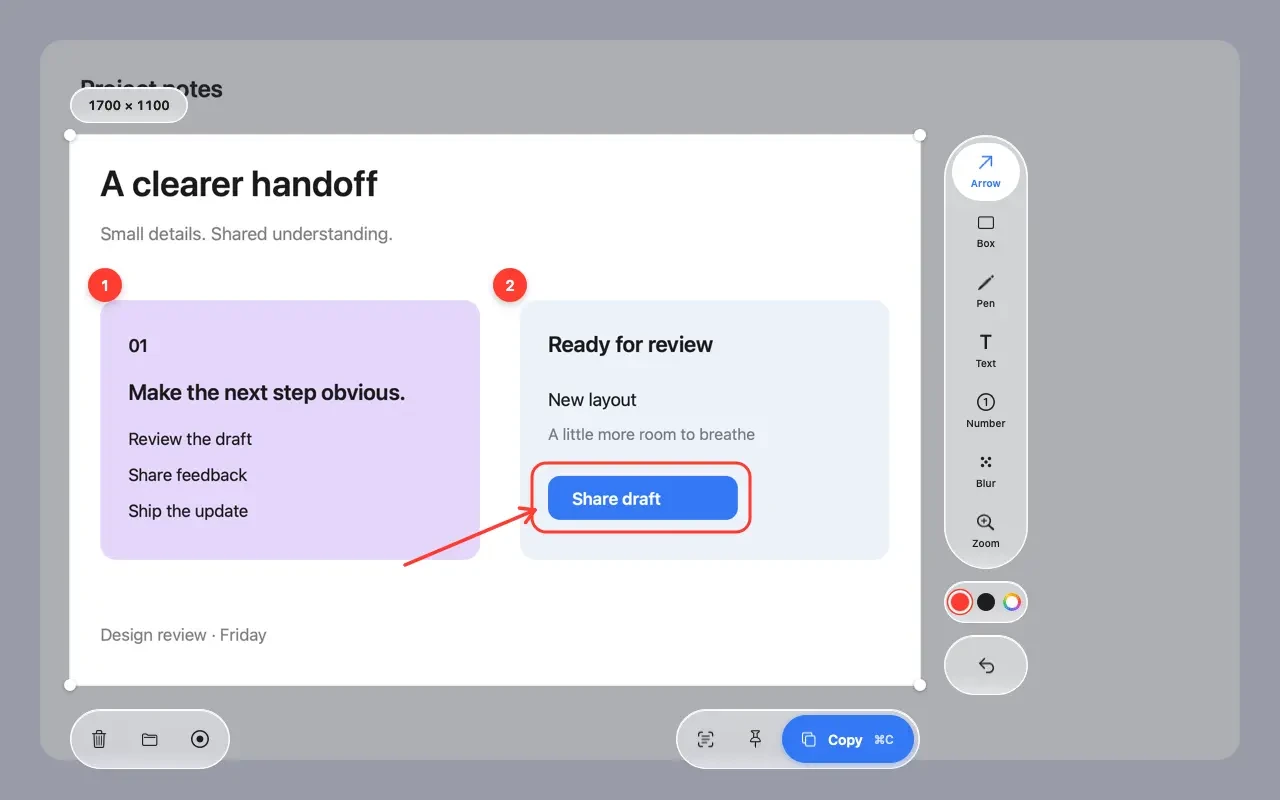
Snap combines annotated PNGs and silent MOVs for $1.99. For a single plain window, try Apple Screenshot first.
Shottr captures scrolling content in one still. Its Basic license is $12 for work. CleanShot X also supports scrolling.
CleanShot X captures your voice, computer sound and camera. On macOS 27+, Apple Screenshot can capture system audio too.
Side by side
Costs cover one person on one compatible Mac for two years, before tax. Filters show documented capabilities. Shortlist up to three apps to see hardware, audio and file-sharing details together.
| App / best fit | What you can send | Price / two years | Explore & verify |
|---|---|---|---|
| Snap | Mark the still. Attach a silent clip. Capture a region or display. Number the steps, blur a name or magnify a small control on the screenshot. Copy the PNG and attach a separate MOV to the same ticket. Recordings are silent. The blur and numbered callouts described here apply to still images. | $1.99 onceU.S. Mac App Store$1.99 over two yearsOne purchase. No subscription listed.How the price adds upOne $1.99 purchase + $0 in listed recurring fees = $1.99 across two years for the current app. The developer’s launch page still says free. Apple’s current U.S. listing gives the purchase price. | View Snap on App StoreCompatibility & sourcesmacOS 13 or later, Intel or Apple silicon. Copy a PNG, save a still or drag out the finished MOV. No Snap account is required. Your own clipboard sync or chosen folder can still share files. U.S. Mac App Store listing · Chillss / Snap · Chillss / Snap privacy |
 CleanShot X | Record the explanation with the screen Record microphone, computer sound and camera, then trim the clip or add cursor-following zooms. Basic includes the same Mac editor as Pro, plus 1 GB for hosted links. Basic covers one year of updates. Continuing updates in year two costs another $19. | $35 onceBasic for one Mac$35 or $54 over two yearsKeep the eligible build, or renew updates once.How the price adds up$35 + $0 = $35 if you keep the eligible build. $35 + $19 = $54 with a second year of updates. Pro is $10 per user per month billed annually ($120 upfront per year, $240 over two years). Both tiers include the editor. | See CleanShot plansCompatibility & sourcesCurrent release requires macOS 13 or later. Contact the developer about older builds. Keep local files, or upload to CleanShot Cloud. Basic includes 1 GB. Pro adds unlimited storage subject to fair use and password-protected links. U.S. dollar plans · Screenshot and recording features · Studio recording workflow |
 Shottr | Fit a long settings pane into one image Capture a scrolling view, copy text with OCR, mark a step or measure the space between two controls. On difficult views, Shottr also documents manual scrolling. Screen recording is on the developer’s feature-request list. Commercial use requires a paid license. | $0 personal$12 Basic for commercial use$0 or $12 over two yearsPersonal use or one commercial Basic license.How the price adds upPersonal noncommercial use can continue at $0, with reminders after day 30. One $12 Basic license covers a single user on up to five computers. The separate $30 Friends Club tier adds experimental features and support. | See Shottr licensingCompatibility & sourcesShottr 1.10.0 requires macOS 12 Monterey or later. Its app bundle includes Intel and Apple silicon builds. Save images locally. Optional uploads can use Shottr Cloud or your own compatible S3 storage. Anyone with a Shottr Cloud image link can access it. Free and paid licenses · Shottr license terms · Feature list and current release · Requested features · Cloud sharing · Scrolling troubleshooting |
 Apple Screenshot | Press Shift–Command–5 and start Capture the screen, a window or a selection. Click the thumbnail to mark up a still. The same toolbar records a clip, and its Options menu lets you pick a microphone. Recording options depend on macOS. Apple adds single-window recording in 26 and system audio in 27. | $0 extraIncluded with a compatible Mac$0 over two yearsNo additional software purchase.How the price adds up$0 now + $0 in year two for the included utility on a compatible Mac. Hardware, OS availability and separate file-hosting services are outside this comparison. | Open Apple’s guideCompatibility & sourcesScreenshot toolbar from macOS Mojave 10.14. Selected-window recording requires macOS 26+. System sound requires 27+. Saves to the Desktop by default. Choose another folder or share a file. A hosted review link is outside the documented workflow. Apple’s screenshot guide · Record the screen on Mac · Capture and markup workflow · Apps included with your Mac |
Workflow finder
Suppose a button fails after three clicks. Support needs one image showing the steps and a 20-second clip showing the failure. Use Snap: Screenshots & Recording by Ido Segev to mark up the PNG and record a separate silent MOV. The U.S. Mac app costs $1.99 and runs on macOS 13 or later. Use the bug report template.
If support needs to hear the failure, the choice changes. On macOS 13 through 26, CleanShot Basic covers microphone and app audio for $35. On macOS 27 or later, Apple’s included recorder can capture system audio.
$1.99 once
Capture the failed step, number the screenshot and blur the account name. Attach the PNG and a separate 20-second silent MOV to your ticket. The second file shows the sequence of clicks.
See the Snap entrySnap’s blur, numbered markers and magnified inset go on the screenshot. Its separate MOV records activity silently. For webcam footage with a narrated demo, CleanShot documents camera capture. Recording features · Compare webcams
A PNG or MOV can travel as an attachment. CleanShot also offers 1 GB of hosted space with Basic. Shottr Cloud images are accessible to anyone with their link. Snap saves locally, while your chosen folder or clipboard may sync through another service. Snap privacy · Shottr sharing
Open the ticket as a recipient and download both attachments. Open the PNG in Preview and play the MOV in QuickTime Player. A downloaded copy can travel with the ticket even if you later change capture apps. With Snap: Screenshots & Recording by Ido Segev, keep the numbered still and silent clip together.
A working link today only proves the item is hosted today. For a ticket you may reopen next quarter, attach an exported copy before deleting the upload or changing plans. Check that the attachment opens with network access off.
CleanShot Basic includes the Mac app, a year of updates and 1 GB of cloud storage. The license decision and the archive decision are separate. Choose CleanShot for an audio demo, then save the exported recording alongside the ticket if it needs to outlive the share link.
Before you choose
We Tried It All recommends Snap for a numbered screenshot and a separate silent recording on macOS 13 or later. Choose CleanShot X for a narrated demo with camera and computer sound. Shottr fits long scrolling stills, and Apple Screenshot is included for occasional captures.
U.S. Mac App Store listing · Studio recording workflow · Feature list and current release · Apple’s screenshot guide
Yes. Ido Segev’s Snap costs $1.99 in the U.S. Mac App Store. Put numbered markers and blur on the still image, then record a separate silent MOV. Sleekshot is a free alternative if you need MP4 or GIF. Its developer documents numbered markers and blur on stills, with recording on macOS 13 or later.
U.S. Mac App Store listing · Chillss / Snap · Sleekshot’s capture and recording guide
CleanShot X documents microphone and computer audio on its current Mac release. Apple Screenshot offers microphone selection and adds Include System Audio in macOS 27. For a silent recording, set the microphone to None and turn off Include System Audio if shown. Snap produces silent MOV files. Shottr currently has no screen recorder.
Studio recording workflow · Apple’s recording instructions · Chillss / Snap · Requested features
Shottr 1.10.0 includes an Intel build with a macOS 12 minimum. It fits a scrolling, annotated still. Use the built-in Screenshot toolbar for a separate screen recording. The current releases of Snap and CleanShot X require macOS 13 or later.
Feature list and current release · U.S. Mac App Store listing · U.S. dollar plans · Apple’s screenshot guide
Commercial use requires a paid license. Basic is $12 once for one user on up to five computers. Personal noncommercial use can continue with purchase reminders after 30 days.
Snap processes captures on the Mac and lets you copy or save files without an account. Shottr and CleanShot X also support local saves. Apple Screenshot saves to the Desktop by default. Download files you need before changing a hosting plan, and check whether your chosen destination syncs to cloud storage.
Chillss / Snap privacy · Screenshot and recording features · Feature list and current release · Apple’s screenshot guide